Showing posts with label Website Hosting. Show all posts

How to Create new website

June 15, 2016 Add Comment

How to Create new website


On this occasion admin will share tutorials How to Create a Complete Website With Images, will be peeled in depth step by stage. This tutorial is suitable for you who still lay, if you are skilled you can skip directly on the optimization only.

Many options how to create a web, it is up to you in choosing a way, because it chooses how it depends on your goal to create a web. From the easiest to the hardest way it's all your choices, obviously every way there are advantages and disadvantages.

What is the Web


The Web is a page that contains both written content, images and videos that can be accessed online (of course according to privacy rules). For those of you who want to sell online or create an online store, want to create a personal blog that contains even want to start an online business it takes the ability to create a web, not hard to know how.


Why Must Have Web or Blog


Almost every business owner has a web to introduce themselves and their products to support the brand, existence and sales. If you are a businessman, do not let you miss the competitors who already have the web.

By knowing the advantages of having a web, it's time you decide your goal in creating the web. Why should you do this early? Because this will greatly affect the appearance, web structure and web end results.

Step - How to Create a Website


Okay enough introduction with web and blog, let's start step - step in how to make web. In order to understand and get maximum results learn slowly

 Specify a Domain Name and Give a Web Name

Domain is your web address, with that address people can visit the web by typing the web address in their browser. For example this web has address, which need to be considered in choosing a web address or domain is make sure the address is easy to remember and not too long so it allows visitors to remember the web address.

Tips on choosing Domains you need to consider:

  1. Most webs that want to aim business using the suffix. Com or. Co., If the suffix was already purchased by others and it was sold, try to buy it.
  2. You may also consider using the .biz or .net domain suffix if the .com domain is not available.
  3. If you have a specific purpose for transactions for example Indonesia area only then use .id, if the American area use .us and so on.
  4. Do not be too push in choosing a domain name, you can use additional words in front or a suffix. For example if the domain baca.com already purchased, try to add the word front me so baca.com or the ending to be bacak.com
  5. Buy a domain with a minimum period of three years, so no one is trying to take advantage of your negligence in the domain renew.
  6. If you are worried that your domain name is being misused, try buying some other domain suffix.

How to Sign / Buy Domain Name


After you decide the domain name you want, it's time you immediately buy the domain so that the domain is not triggered by other parties. Many places to buy domains, can be domestic or overseas, are clear in buying domains consider the following tips:
  1. Do not check the domain name repeatedly on the web that does provide domain name purchase services, in some cases the domain name will be immediately purchased by the web provider because it is considered a lot of demand so that the selling price will increase.
  2. If you want to buy abroad make sure already have a credit card, because the author's experience using paypal only credit cards that can be used (If there are other tricks please add in the comments column).


Determining Techniques How to Create a Website


Okay now you have a domain, the next is to determine the techniques in how to create a website, because in making the web there are several ways we can do and this greatly affects the results itself.

As already said in the opening words that every technique has its advantages and disadvantages, this is a straightforward technique for creating a popular website:

  1. Hosting and Free Domains
  • Blogspot: Please go to the tutorial " How to Create Blog in Blogspot Complete Picture "
  • WordPress.com: Just go to Tutorial " How to Make Blog in WordPress Free Complete "
  1. Hosting and Paid Domains
  • WordPress.org: If you intend to use CMS wordpress and upload it yourself like this web, please follow this tutorial until it runs out
  • Other CMS -Content Management System: Like CI (Code Igniter) for example CMS.
  • Hand Coding: Make your own from scratch

For more details please go to the tutorial " Some Ways to Make the Most Popular Web ". For those of you who opt for how to create a website using CMS WordPress or do not use the free hosting facility, please continue reading the tutorial. For those who do not, please take the essence of advanced tutorial, because basically the same is just different technique.


How to Install CMS WordPress On Offline PC


Before web hosting, we should download the WordPress CMS file at wordpress.org , by trying offline first, we will get benefits like:

  1. You do not have to connect online for frequent changes (often change theme, plugin optimization until theme optimization)
  2. By not being connected online, the speed in optimization is increased when compared to optimization after the web is hosted online.
  3. Obviously we've saved the quota
  4. Make sure everything is in accordance with the desired start of the design until the optimization of loading speed.
  5. If indeed there is a change, we can change it when the web is online, because the changes are only slightly.

Building a Website Structure


After you install CMS WordPress or other CMS, our next task is to start building website structure. This is very important because it discusses what pages you want to display on your website.
The structure of your web site depends on the purpose of creating your web. For example, if you create a web for the purpose of creating an online store, then the web page you need is as follows:

  1. Home Page (Home)
  2. Product page or catalog
  3. Company Info or about us
  4. Payment page
  5. Contact page / contact page
  6. Blog tool to influence your prospective customers.

How Web Hosting Has Been Created


Adding Content or Web Pages / Blogs


The web is online and we can add articles or tutorials. In this section will be discussed the importance of creating appropriate SEO content, what are the advantages of making an appropriate SEO article? Here are some important points:
  1. Content will soon be indexed by Google
  2. Content will have a good position in the SERP
  3. Not easily shifted by competitors who have similar content
  4. Increase your web ranking
  5. Increase the trust of potential customers (the content contains reasons that support your merchandise).
  6. Strengthen the Brand that you build, because if a lot of your content is weighted it will add strength to your brand.
  7. And many more

Web Optimization / Blog


The last thing is no less important is to optimize your web. Optimizations include:

  1. Blog loading speed
  2. SEO
  3. Blog Security
  4. Back-Up function

Conclusion How to Create a Website

Similarly tutorials How to Create the Latest and Complete Website , there are still shortcomings that the author has not conveyed due to this limited media. For other tutorials related to making the web can visit the Website Categories page .




How to Hosting a WordPress Blog Website using CPanel

March 15, 2011 Add Comment
How to host a website or blog is very easy if we use CPanel, another story if we use a hosting venue or still not installed anything, we must prepare mysql (for those who use mysql), apache (for those who use php) other.

In the previous tutorial we have discussed how to register the domain, if not please visit the tutorial " How to Register Domain Blog Website Complete " and now it's time we discuss the tutorial how to web hosting or blog with cpnel. Oh yes, in web hosting or blog, whatever it is the kind of blog or its web, the way is still the same. The basic steps are as follows:

  1. Set up local database (can be dumped first)
  2. Prepare php files or similar (asp or other)
  3. Filezilla or other upload tool (ftp)
  4. Where to host (yes yes it is)
  5. Make sure the hosting place is available where our database and php running (usually there is cpnel for this)
  6. Setting the local database settings to the hosting database on the connection php file connection
  7. Testing and running

How to Hosting a WordPress using CPanel

Note the point number 5 above, so that the tutorial is not too widened, in this tutorial we just discuss how to web hosting or blog with cpnel. For those candidates where his hosting does not exist CPanel, will be made a special tutorial to install the mysql and apache database manual. For the type of blog or website we will be hosting in this tutorial is "WordPress".

Still remember the tutorial " How to Install WordPress Offline in Xampp Manual ", there we have installed wordpress locally on our pc, usually this way taken in the framework of development theme. In this tutorial, we will be hosting our local wordpress blog to a hosting provider which of course has provided CPanel.

By following the process in this tutorial, we will move all of our content on localhost (posts, pages, images, etc.), templates, and plugins from the local server to the hosting site.


Step One: Export the WordPress Local Database

The first thing we need to do is export the Local Database database. We will use phpMyAdmin to export. To access phpMyAdmin just type the address http: //localhost/phpmyadmin/in the browser and click the WordPress database. Next, click the Export button on the menu bar.


  • Note that what is exported is the database that we want to host
  • select export menu
  • Export menu
  • Select Custom
  • Select All Tables
  • Compression, select gzip

In the Export Method option select a custom method, which will give us more options to export the database. Select all tables for export and gzip for compression. Scroll down to the bottom of the page and press the Go / Send button to download the database.

Step 2: Uploading a WordPress File (WordPress Hosting)


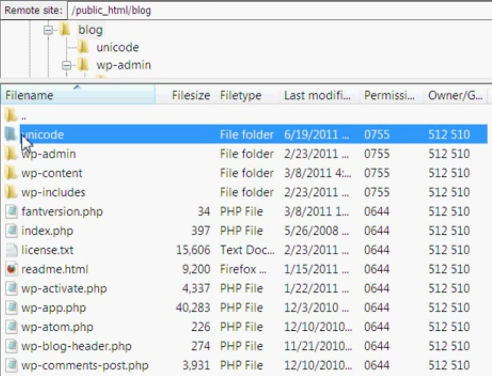
Now open FTP software and connect to web hosting. Once connected to the site, make sure we upload the files in the proper directory. For example if we want the site to be hosted on yoursite.com, then we will upload all the files in the public_html directory in the hosting server.


  1. Local wordpress web address
  2. Web hosting address
  3. Select all files, right-click and select upload

Step 3: Create a MySQL Database in Server Hosting

When FTP uploads WordPress files, we can all import the database to the hosting server. Because this tutorial discusses how to host a wordpress blog with CPanel, so we will discuss how to create a database using CPanel. Login to the CPanel dashboard and click on the MySQL database icon that can be found in the database section.

After creating the database, scroll down to the MySQL user section and create or add an existing user to the database. After adding the user, CPanel will take us to set the MySQL privilege for that user. Just give all the privileges to the user we just added or created earlier.

Step 4: Importing WordPress Database in Server Hosting

The next step in this process is to import the WordPress database. Please go to the CPanel dashboard, scroll down to the database section and click phpMyAdmin. This will take us to phpMyAdmin.

phpMyAdmin will show you the new database we have created earlier. Click on the Import tab in the top menu. On the import page, click on the file select button and then select the gzip database file (the gzip file we created in the previous step). Finally, press the Go button at the bottom of the page. phpMyAdmin will now import the WordPress database.

Step 5: Change the Web URL

Now we need to change the URL of the web or blog, so we can make the WordPress website can be accessed online. In phpMyAdmin, look for the wp_options table in the database we just imported in step 4. If you change the database prefix, then not wp_options.

Click on the browse button (browse) next to wp_options or links on the sidebar to open a page with a list of fields in the table wp_options. See image below:


Below the field options_name, look for row with value siteurl. Click the Change icon that can be found on the far left at the beginning of the line.

When you click the edit icon, a new window will appear. In the input box ' option_value', we will see local URL like: http://localhost/wordpress. Be careful to enter new site urls in this field, for example: http://www.yousite.com. Save by clicking the Go / send button. Do the same for a field options_name containing home.

Step 6: Setting Database Connection


Now that we have imported the database, and all our content has been uploaded, it is time to configure WordPress. At this time, if we try to access the site, then our site will menu error page in the form of database connection error.

Step 7: Fix Image Url and Broken Link with Update Database


Every time we move a WordPress site from one domain to another, or from a local server to a Hosting site, we will find broken and missing links that also cause problems with image loads. We can use SQL queries or use the WordPress Velvet Blues plugin .
For those who want to do it via SQL, here is a simple SQL query that can solve this problem:


Conclusion How to Hosting Blog or Website

tutorial How to Hosting Blog Website WordPress CPanel , may be useful for visitors. Oh yes, hopefully web that has been uploaded can run perfectly. Do not forget to immediately check the site to make sure that everything works as well as expected.

If there is anything to be asked about any problems and questions please feel free to comment below and we will try to help as much as we can.

For other settings, we can learn  through the Awesome Examples Fonts page . In the page, we can set the icons to rotate, reversed, given the border and much more. Similarly tutorial install and use the Awesome Font. Similarly tutorial how to install and use awesome fonts , Need to know if in previous version (version 3.2.1), Awesome Font changed the calling code of icons and also on the link from Netdna to MaxCDN , for that before deciding to update the icon, we must learn more about how to retrieve the link and call the icon (fear that there is another change).


Which web hosting service is best?

September 17, 2010 Add Comment

Which web hosting service is best?


One important factor to maintain the reputation and the existence of a website or blog especially those using self hosting services such as choosing the right hosting provider and quality. If the server is frequently down will definitely disappointing and detrimental to the owner of a website or blog, both of SEO, traffic and reputation.
I own so far been quite satisfied with services provided by the company where I put my blog hosting for some, this is because of the hosting discount facilities. Update 24 hours, the server is quite stable and quick to respond when there are things we need. There are a few tips or guidance in choosing web hosting, include the following:


  • Consider the target visitors blog / your website, if you want the traffic is mostly from overseas, you should use servers located abroad.

  • Check the features offered such as auto-installer script, email accounts, FTP, SubDomains, parked domains, etc., besides the capacity offered by hosting providers, whether in accordance with your needs and able to adapt in line with the development of your site. Many hosting providers that offer versatile features with a capacity of bombast and only marketing tactic, or a low price with limited features that end up forcing you to pay far more expensive when you need an upgrade. One service provider with a complete feature is hostgator coupon.

  • Disk Space Quota and Quantities given. Disk Space was the capacity of the server hosting provided it for you, to store your website files. The best option is a hosting package that gives Disk Space in accordance with needs.

  • Magnitude of the given bandwidth. Bandwidth is the capacity of monthly access provided to access your website. Every person who opens a website or download a file from your website to be displayed in a browser such as Mozilla Firefox or Internet Explorer, it will eat the bandwidth. Capacity and bandwidth usage will be reset every month.

  • Domains Allowed. Number of domains that can be used in a hosting package. You can use the first fruit of hosting packages for your entire domain name if the hosting package provides access to it, and you also need to consider the amount of disk space and bandwidth provided, is it enough to run some of your own domain.

Straight Way of SEO

April 20, 2010 Add Comment

Straight Way of SEO


These days the term search engine optimization is a hot topic. To define the term it can be said that the search engine optimization is the process by which the search engine page ranking of a website can be increased and in the process increases the popularity of the website and thus it can gain considerable amount of web traffic. Thus the search engine optimization is the most essential thing for any website too increase the ranking on the search engine result pages as well as to increase website traffic to the site.

The search engine listing is done in two ways. Among these one is the sponsored listing for which the websites pays the search engines to have their links on the search engine result pages and the other one is the Organic SEO. The Organic SEO is the natural means of search engine optimization and through this process the search engine page ranking can be increased to a great extent. Moreover, there are several things that are to be done for the proper optimization of a website. The main things among these are the keyword research, link building, and other such things.

For the search engine optimization the main target are the major search engines like Google, Yahoo, and MSN. These are the most popular search engines where you can find the listing of almost each and every website available on the internet. These search engines send their spiders to crawl the web pages and collect information about the website and then those are sent to the search engine indexer and after that the indexer further collects farther information on the websites and then these websites are given the page ranking on the basis of these information. The role of the search engine optimization is to work on this field so that when the search engine spiders crawl the web pages the information they collect are in the favor of the website to rise higher in page ranking on the search engine result pages.

The search engine page ranking is the most preferred thing for any website because of the reason that with the better ranking on the search engine result pages the website can gain more potential visitors to their site. The fact is that the search engine users are in the tendency to visit those sites first which comes to them first. And therefore the sites with poor page ranking are seldom visited. Moreover, what good is a site if it is never visited.